Installation
- Thanox is a standalone APK that can be installed by simply downloading the APK and installing it on your device.
- Currently only supports Android 6.0 and above ROMs.
- Development is based on AOSP and theoretically compatible with all near-native ROMs and most other domestic ROMs.
Activation
Most of Thanox's features are completed in system processes, so Thanox will patch the Android system.
Currently supports two activation modes (choose one):
- Xposed mode, Android 6+
- Magisk mode, Android 11+, experimental, currently with relatively fewer features
Xposed Mode
- Your device must have properly installed the Xposed framework (or other similar frameworks supporting Xposed API)
- After installing Thanox APK, go to the Xposed installer app and enable Thanox
- After completion, restart your device
- For scope-supporting Xposed frameworks, please enable at least the Android system; if you want to enable incognito features for a certain app, you also need to enable the target app
Note: After each update of Thanox, it's recommended to re-enable Thanox and restart
Magisk Mode (Experimental)
- Your device must have properly installed the Magisk framework
- Your device must have properly installed the Riru framework (Magisk v23+) or enabled Zygisk mode (Magisk v24+)
- Install the latest Thanox app
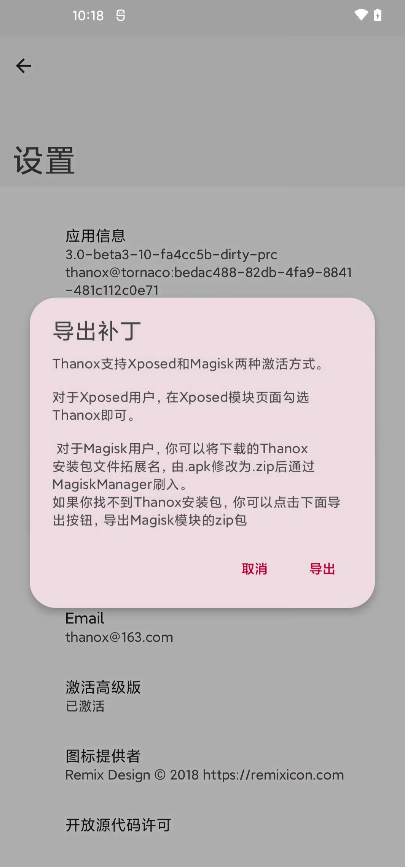
- Click Thanox settings -- About -- Patch Status to export magisk patch; or directly renaming Thanox APK to .zip format creates a magisk patch
- Flash the magisk patch obtained in the previous step
Note: Each update of Thanox requires updating the magisk patch.
Export page shown as follows: