
Profile Mode
0.1. Preface
You can build a simple rules engine yourself. All you need is to create a bunch of objects with conditions and actions, store them in a collection, and run through them to evaluate the conditions and execute the actions. Martin Fowler
0.2. Introduction
Simple understanding of profile mode:
"When to, do what."
"When to" is the trigger condition (condition)
"Do what" is the action (actions)
0.3. Create New
Create a new entry example as follows, in JSON format for example:
[
  {
    "name": "Current pkg",
    "description": "When app switches, use Toast to display the package name of the current app",
    "priority": 2,
    "delay": 2000,
    "condition": "frontPkgChanged == true",
    "actions": [
      "ui.showShortToast(activity.getFrontAppPackage());"
    ]
  }
]
Parameter explanation:
| Parameter Name | Meaning |
|---|---|
| name | Please use English, profile name, multiple profiles cannot be duplicated, otherwise will be overwritten |
| description | Arbitrary description |
| priority | Priority level, determines execution order |
| delay | Action execution delay, time unit is milliseconds |
| condition | Trigger condition, supports mvel expressions, optional fact-based facts-param for conditions can be found in the chapter below Syntax notes: Double quotes need to use \ escape character escapes |
| actions | Actions to be executed, supports mvel expressions , can be set multiple, optional handlers for actions can be found in the chapter below Syntax notes: Double quotes need to use \ escape character escapes |
0.4. Facts-params
In addition to providing a rules engine, Thanox also provides common facts and parameters for condition checking.
0.4.1. App Install, Uninstall, Update
After an app is installed, uninstalled, or updated, Thanox will publish this fact and inject some parameters. You can use these parameters for conditional judgment or as parameters when executing actions.
| Parameter Name | Type | Meaning | Example |
|---|---|---|---|
| pkgAdded | Boolean | New app has been installed | Below |
| pkgRemoved | Boolean | App has been uninstalled | Below |
| pkgUpdated | Boolean | App has been updated | Below |
| pkgName | String | Package name of installed app | Below |
pkgAdded Example
As a conditional judgment:
"condition": "pkgAdded == true"
pkgName Example
As a conditional judgment:
"condition": "pkgAdded == true && pkgName == \"com.tencent.mm\""As an action parameter:
"ui.showShortToast(pkgName);"
0.4.2. App Switching
When foreground apps switch, Thanox will also publish this fact, with the parameters below.
| Parameter Name | Type | Meaning | Example |
|---|---|---|---|
| frontPkgChanged | Boolean (true/false) | Foreground app has switched | Below |
| from | String (string) | Which app was switched from, package name | Below |
| to | String (string) | Which app was switched to, package name | N/A |
frontPkgChanged Example
As a conditional judgment:
"condition": "frontPkgChanged == true"
from Example
As a conditional judgment, has WeChat gone to background:
"condition": "frontPkgChanged == true && from == \"com.tencent.mm\""
0.4.3. Task Cleanup
When a task for some app is removed, the usual scenario is in Recent Tasks, where the task is swiped away by the user. At this time, Thanox will also publish this fact, with parameters below.
| Parameter Name | Type | Meaning | Example |
|---|---|---|---|
| taskRemoved | Boolean (true/false) | Task has been removed | Below |
| pkgName | String (string) | Package name of the app the task belongs to | Below |
taskRemoved Example
As a conditional judgment:
"condition": "taskRemoved == true"
pkgName Example:
As a conditional judgment, kill app when WeChat task is removed:
"condition":  "taskRemoved == true && pkgName == \"com.tencent.mm\"",
"actions": [
  	"ui.showShortToast(\"Killing WeChat\");",
  "killer.killPackage(pkgName);"
]
0.4.4. Activity Created
Usually when an app's activity page is created it can be called Activity Created. At this time, Thanox will also publish this fact, with parameters below. Generally, the lifecycle of an activity is Created (created)-> Resumed (displayed, can be interacted with) -> Paused (paused) -> Destroyed (destroyed). Pay attention to this:
If an activity reaches Resumed state and is covered by other activities, for example covered by Alipay payment page, it follows the process: Resumed -> Paused (covered by another activity) -> Resumed (if the other activity is destroyed, return to this activity, then resumes to Resumed state without recreating again).
Detailed Android activity lifecycle see: https://developer.android.com/guide/components/activities/activity-lifecycle
| Parameter Name | Type | Meaning | Example |
|---|---|---|---|
| activityCreated | Boolean (true/false) | Activity page is created | Below |
| componentNameAsString | String (string) | Complete activity component name, the name copied from Thanox Show Current Activity is this | Below |
| componentNameAsShortString | String (string) | Shortened activity component name | Below |
| componentName | ComponentName | Activity component | Below |
| pkgName | String (string) | App's package name | Below |
0.4.5. Activity Resumed
When an activity page is displaying, it can be called Activity Resumed. At this time, Thanox also publishes this fact with the parameters below.
| Parameter Name | Type | Meaning | Example |
|---|---|---|---|
| activityResumed | Boolean (true/false) | Activity is displayed | Below |
| componentNameAsString | String (string) | Complete activity component name, the name copied from Thanox Show Current Activity is this | Below |
| componentNameAsShortString | String (string) | Shortened activity component name | Below |
| componentName | ComponentName | Activity component | Below |
| pkgName | String (string) | App package name | Below |
Often many app homepages have ads displayed initially, with a skip button. The following is an ad skip example using this fact:
[
  {
    "name": "AD Skip",
    "description": "Skip button click on caiyun weather homepage ad page",
    "priority": 1,
    "condition": "activityResumed == true && componentNameAsShortString == \"com.nowcasting.activity/.SplashActivity\"",
    "actions": [
      "ui.showShortToast(\"Trying to click skip...\");",
      "ui.findAndClickViewByText(\"Skip\", \"com.nowcasting.activity/com.nowcasting.activity.SplashActivity\");"
    ]
  }
]
Note: The condition here only checks Caiyun Weather. You can use the || operator for multiple condition checks. The ui operations here will be introduced later.
0.4.6. Activity Changed
Thanox publishes this event when the current foreground activity changes. (Since Thanox(or Pro)-2.5)
| Parameter Name | Type | Meaning | Example |
|---|---|---|---|
| frontActivityChanged | Boolean (true/false) | Front activity changed | None |
| fromActivity | ComponentName | Activity component | None |
| toActivity | ComponentName | Activity component | None |
ComponentName is the activity component name.
For example: com.android.messaging/com.android.messaging.ui.conversationlist.ConversationListActivity
In Thanox's developer settings, the "Show Current Activity" feature also displays the ComponentName of the current activity.
0.4.7. App Stop Running
When an app is killed or stopped running for other reasons, Thanox publishes this fact.
| Parameter Name | Type | Meaning | Example |
|---|---|---|---|
| pkgKilled | Boolean (true/false) | Task removed | Below |
| pkgName | String (string) | App package name | Below |
0.4.8. Screen On/Off
| Parameter Name | Type | Meaning | Example |
|---|---|---|---|
| screenOn | Boolean (true/false) | Screen on event | None |
| screenOff | Boolean (true/false) | Screen off event | None |
| userPresent | Boolean (true/false) | Unlock event | None |
0.4.9. Battery Changes
| Parameter Name | Type | Meaning | Example |
|---|---|---|---|
| batteryChanged | Boolean (true/false) | Battery level changed | None |
| batteryLevel | int | Battery level | None |
| isCharging | Boolean (true/false) | Whether charging | None |
| isAcCharge | Boolean (true/false) | Whether AC | None |
| isUsbCharge | Boolean (true/false) | Whether USB charging | None |
0.4.10. Bluetooth Events
| Parameter Name | Type | Meaning | Example |
|---|---|---|---|
| btStateChanged | Boolean (true/false) | Bluetooth power state changed | None |
| btStateOff | Boolean (true/false) | Bluetooth is in off state | None |
| btStateTurningOff | Boolean (true/false) | Bluetooth is turning off | None |
| btStateOn | Boolean (true/false) | Bluetooth is on | None |
| btStateTurningOn | Boolean (true/false) | Bluetooth is turning on | None |
| btConnectionStateChanged | Boolean (true/false) | Bluetooth connection state changed | None |
| btConnectionStateConnected | Boolean (true/false) | Bluetooth is connected state | None |
| btConnectionStateConnecting | Boolean (true/false) | Bluetooth is connecting state | None |
| btConnectionStateDisconnected | Boolean (true/false) | Bluetooth is disconnected state | None |
| btConnectionStateDisconnecting | Boolean (true/false) | Bluetooth is disconnecting state | None |
| btBoundedDevices | List of BluetoothDevice | List of bonded bluetooth devices | None |
| btBoundedDeviceAddresses | List of String | List of bonded Bluetooth device addresses | None |
| btBoundedDeviceAliasNames | List of String | List of bonded Bluetooth device aliases | None |
| btBoundedDeviceBatteryLevel | List of Int | List of bond Bluetooth device battery levels | None |
Note: Battery level in percents from 0 to 100, or -1 if Bluetooth is disabled, or device is disconnected, or does not have any battery reporting service, or return value is invalid
Example 1:
[
  {
    "name": "BT Connection State",
    "description": "Bluetooth connection state monitoring, listen for connection event in this case. Toast displays all connected devices and checks whether it connects to MDR-XB650BT",
    "priority": 2,
    "condition": "btConnectionStateChanged == true && btConnectionStateConnected == true",
    "actions": [
      "ui.showShortToast(\"Bluetooth connected to new device, all device names are: \" + btBoundedDeviceAliasNames);",
      "ui.showShortToast(\"Bluetooth connected to new device, does it contain MDR-XB650BT device?: \" + btBoundedDeviceAliasNames.contains(\"MDR-XB650BT\"));"
    ]
  }
]
Example 2:
[
  {
    "name": "BT Connection State Advanced",
    "description": "Similar to Bluetooth connection state monitoring, only using btBoundedDevices:BluetoothDevice parameter",
    "priority": 2,
    "condition": "btConnectionStateChanged == true && btConnectionStateConnected == true",
    "actions": [
      "ui.showShortToast(\"Bluetooth connected to new device, first device name is: \" + btBoundedDevices.get(0).getAddress());"
    ]
  }
]
0.4.11. Wifi State Change
Event sent when Wifi state changes. (Since Thanox 2.5-2)
| Parameter Name | Type | Meaning | Example |
|---|---|---|---|
| wifiStateChanged | Boolean (true/false) | Has Wifi state changed | None |
| wifiState | WifiState | State | None |
WifiState:
data class WifiState(
  // Whether it's enabled
  val enabled: Boolean,
  // Status info (example: No network)
  val statusLabel: String?,
  // SSID (example: ChinaNet-d2Xq-5G)
  val ssid: String?
)
0.4.12. System Boot
| Parameter Name | Type | Meaning | Example |
|---|---|---|---|
| systemReady | Boolean (true/false) | System boot complete | None |
0.4.13. Push Messages
| Parameter Name | Type | Meaning | Example |
|---|---|---|---|
| fcmPushMessageArrived | Boolean (true/false) | Received GCM/FCM message push | None |
| pkgName | String (string) | App package name | None |
0.4.14. Notifications
| Parameter Name | Type | Meaning | Example |
|---|---|---|---|
| notificationAdded | Boolean (true/false) | New notification arrived | None |
| notificationUpdated | Boolean (true/false) | Notification updated | None |
| notificationRemoved | Boolean (true/false) | Notification removed | None |
| pkgName | String (string) | Package name of app that notification belongs to | None |
| userId | Int | User ID of notification app | None |
| notificationTitle | String (string) | Notification title | None |
| notificationContent | String (string) | Notification content | None |
| notification | NotificationRecord | Notification record, this model contains more detailed information, View model definition | None |
Example:
[
  {
    "name": "Notification events",
    "description": "Notification events",
    "priority": 1,
    "condition": "notificationAdded || notificationRemoved || notificationUpdated",
    "actions": [
      "ui.showShortToast(\"Notification event \" + pkgName + notificationContent);"
    ]
  }
]
0.4.15 Shortcuts
You can create a meaningful desktop shortcut. When you click this desktop shortcut, Thanox will publish the fact represented by this shortcut.
For example; implement a one-click screen lock shortcut, meaning: lock screen when clicking the one-click screen lock shortcut on desktop.
First create a shortcut engine:
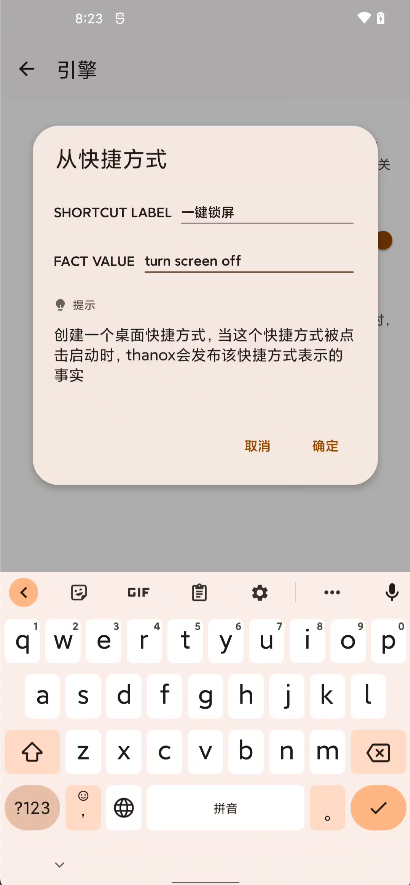
Next, add a profile mode to listen for this shortcut's launch event and specify the screen lock command:
[
  {
    "name": "Profile shortcut",
    "description": "Listen for a shortcut launch event, one-click lock screen example",
    "priority": 2,
    "condition": "shortcutLaunched == true && shortcutValue == \"turn screen off\"",
    "actions": [
      "power.sleep(0);"
    ]
  }
]
After saving, clicking the one-click lock screen shortcut on the desktop will implement the one-click lock screen function.
0.5. Handle
Thanox will provide part of the handle capabilities needed to execute actions. For example, ui, dedicated for interface display related operations.
You can use handle.action(params) to execute custom actions.
Below are the currently supported Handle capabilities.
0.5.1. killer
| Capability | Meaning | Parameters | Example | Return Value |
|---|---|---|---|---|
| killPackage | Kill app | Package name | killer.killPackage("com.tencent.mm") | Boolean (true/false) |
Interface definition:
@HandlerName("killer")
interface IKiller {
    boolean killPackage(String pkgName);
}
Example:
"actions": [
  // Kill WeChat
  "killer.killPackage(\"com.tencent.mm\")"
]
0.5.2. activity
| Capability | Meaning | Parameters | Example | Return Value |
|---|---|---|---|---|
| launchProcessForPackage | Launch app process | Package name | Below | Boolean (true/false) |
| launchMainActivityForPackage | Open app main interface | Package name | Below | Boolean (true/false) |
| getLaunchIntentForPackage | Get app's launch Intent | Package name | Below | Intent |
| getFrontAppPackage | Get current foreground app package name | None | Below | String (string) |
| getFrontAppPackageComponent | Get current foreground app component | None | Below | ComponentName |
Interface definition:
@HandlerName("activity")
interface IActivity {
    boolean launchProcessForPackage(String pkgName);

    boolean launchActivity(Intent intent);

    boolean launchMainActivityForPackage(String pkgName);

    Intent getLaunchIntentForPackage(String pkgName);

    String getFrontAppPackage();

    ComponentName getFrontAppPackageComponent();
}
Example:
"actions": [
  // Launch WeChat process
  "activity.launchProcessForPackage(\"com.tencent.mm\")",
  // Open WeChat main interface
  "activity.launchMainActivityForPackage(\"com.tencent.mm\")",
  // Toast show foreground app package name
  "toast.showShortToast(activity.getFrontAppPackage())"
]
0.5.3. power
Power related capabilities
| Capability | Meaning | Parameters | Example | Return Value |
|---|---|---|---|---|
| sleep | Sleep (lock screen) | Delay in milliseconds | Below | None |
| wakeup | Wake up | Delay in milliseconds | Below | None |
| setBrightness | Set screen brightness | Brightness Level value (0~255) | Below | None |
| getBrightness | Get current brightness | None | Below | Brightness Level value (0~255) |
| setAutoBrightnessEnabled | Set automatic brightness switch | true/false | Below | None |
| isAutoBrightnessEnabled | Whether automatic brightness is enabled | None | Below | true/false |
Interface definition:
@HandlerName("power")
interface IPower {
    void sleep(long delay);

    void wakeup(long delay);

    void setBrightness(int level);

    int getBrightness();

    void setAutoBrightnessEnabled(boolean enable);

    boolean isAutoBrightnessEnabled();
}
Example:
{
    "actions": [
        // Lock screen immediately
        "power.sleep(0)",
        // Wake up screen after 1 second
        "power.wakeup(1000)",
        "power.setAutoBrightnessEnabled(false)",
        "power.setBrightness(power.getBrightness() + 1)",
    ]
}
0.5.4. task
Task related capabilities
| Capability | Meaning | Parameters | Example | Return Value |
|---|---|---|---|---|
| removeTasksForPackage | Remove app's recent tasks | Package name | Below | None |
| hasTaskFromPackage | Whether app has recent tasks | Package name | Below | Boolean (true/false) |
| clearBackgroundTasks | Call Thanox task cleanup function, clear all recent tasks | None | Below | None |
Interface definition:
@HandlerName("task")
interface ITask {
    void removeTasksForPackage(String pkgName);

    boolean hasTaskFromPackage(String pkgName);

    void clearBackgroundTasks();
}
Example:
{
  	// Check whether WeChat has tasks
    "condition": "true && task.hasTaskFromPackage(\"com.tencent.mm\")",
    "actions": [
        // Remove WeChat's recent tasks
        "task.removeTasksForPackage(\"com.tencent.mm\")"
    ]
}
0.5.5. ui
Interface related
| Capability | Meaning | Parameters | Example | Return Value |
|---|---|---|---|---|
| showShortToast | Display short hint | None | Below | None |
| showLongToast | Display longer hint | None | Below | None |
| showDialog | Show dialog box | Title text, message text, confirmation button text | Below | None |
| showNotification | Show notification | Tag (for canceling notification), title text, message text, whether important | Below | None |
| cancelNotification | Cancel notification | Tag | Below | None |
| showDanmu | Show a danmaku [since Thanox4.0.9] | Danmaku text | Below | None |
| showDanmu | Show danmaku with icon [since Thanox4.0.9] | Icon, danmaku text | Below | None |
Interface definition:
@HandlerName("ui")
interface IUI {

    void showShortToast(@NonNull String msg);

    void showLongToast(@NonNull String msg);

    void showDialog(@Nullable String title,
                    @NonNull String msg,
                    @Nullable String yes);

    void showNotification(
            @NonNull String notificationTag,
            @NonNull String title,
            @NonNull String msg,
            boolean important);

    void cancelNotification(@NonNull String notificationTag);

    void showDanmu(@NonNull Object msg);

    /**
     * Show a danmaku on your screen.
     *
     * @param icon Icon for danmaku, supported format:
     *             app icon: app://app.package.name
     * @param msg  The text to show
     */
    void showDanmu(@Nullable String icon, @NonNull Object msg);
}
Example using the danmaku API:
[
  {
    "name": "Danmaku notify Danmu notification",
    "description": "Show danmaku when notification posted Show Danmu on notification posted",
    "priority": 1,
    "condition": "notificationAdded && !notification.isForegroundService && pkgName != \"android\"",
    "actions": [
      "ui.showDanmu(\"app://\" + pkgName, thanos.pkgManager.getAppInfo(pkgName).appLabel + \" \" + notificationTitle + \"\n\" + notificationContent);"
    ]
  }
]
0.5.6. hw
Hardware operation capabilities
| Capability | Meaning | Parameters | Example | Return Value |
|---|---|---|---|---|
| enableWifi | By name | Package name | Below | Boolean (true/false) |
| disableWifi | By name | None | Below | Boolean (true/false) |
| isWifiEnabled | By name | None | Below | Boolean (true/false) |
| enableLocation | By name | None | Below | Boolean (true/false) |
| disableLocation | By name | None | Below | Boolean (true/false) |
| isLocationEnabled | By name | None | Below | Boolean (true/false) |
| enableBT | By name | None | Below | Boolean (true/false) |
| disableBT | By name | None | Below | Boolean (true/false) |
| isBTEnabled | By name | None | Below | Boolean (true/false) |
| enableNfc | By name | None | Below | Boolean (true/false) |
| disableNfc | By name | None | Below | Boolean (true/false) |
| isNfcEnabled | By name | None | Below | Boolean (true/false) |
| enabledFlashlight | By name | None | Below | Boolean (true/false) |
| disableFlashlight | By name | None | Below | Boolean (true/false) |
| isFlashlightEnabled | By name | None | Below | Boolean (true/false) |
| isFlashlightAvailable | Whether flashlight is available (occupied? no hardware?) | None | Below | Boolean (true/false) |
Interface definition:
@HandlerName("hw")
interface IHW {
    boolean enableWifi();

    boolean disableWifi();

    boolean isWifiEnabled();

    boolean enableLocation();

    boolean disableLocation();

    boolean isLocationEnabled();

    boolean enableBT();

    boolean disableBT();

    boolean isBTEnabled();

    boolean enableNfc();

    boolean disableNfc();

    boolean isNfcEnabled();

    boolean enabledFlashlight();

    boolean disableFlashlight();

    boolean isFlashlightEnabled();

    boolean isFlashlightAvailable();
}
Example:
[
  {
    "name": "Enable BT",
    "description": "Open bluetooth when opening WeChat",
    "priority": 2,
    "condition": "frontPkgChanged == true && to == \"com.tencent.mm\"",
    "actions": [
      "ui.showShortToast(\"Bluetooth status \" + (hw.isBTEnabled() ? \"on\" : \"off\"));",
      "ui.showShortToast(\"Opening Bluetooth...\");",
      "ui.showShortToast(\"Bluetooth open \" + (hw.enableBT() ? \"success\" : \"fail\"));",
      // Enable GPS
      "hw.enableLocation()",
      "hw.enableWifi()"
    ]
  }
]
0.5.7. io
File read/write capabilities.
Note: Due to file permissions, all file root directory is /data/system/thanos_xxx/profile_user_io
| Capability | Meaning | Parameters | Example | Return Value |
|---|---|---|---|---|
| read | Read file | Relative file path | N/A | String |
| write | Write content to file | Relative file path | N/A | Boolean |
| writeAppend | Write content to file, append | Relative file path | N/A | Boolean |
Interface definition:
@HandlerName("io")
interface IIO {

    String read(String path);

    boolean write(String path, String content);

    boolean writeAppend(String path, String content);
}
0.5.8. data
Mobile data related capabilities.
| Capability | Meaning | Parameters | Example | Return Value |
|---|---|---|---|---|
| setDataEnabled | Set mobile data status | true for on, false for off | Below | Boolean (true/false) |
| setDataEnabled | Set mobile data status (can specify card sequence) | Card sequence, true for on, false for off | Below | None |
| setDataEnabledForSlot | Set mobile data status (can specify card slot) | Card slot, true for on, false for off | Below | None |
| isDataEnabled | Get mobile data status | true for on, false for off | Below | Boolean (true/false) |
| isDataEnabledForSlot | Get mobile data status (can specify card slot) | true for on, false for off | Below | Boolean (true/false) |
| setDataNetworkType | Set network mode | type | Below | None |
| setDataNetworkTypeForPhone | Set network mode (specify some card) | phoneId,type | Below | None |
| setDataNetworkTypeForSlot | Set network mode (specify some card slot) | slotId,type | Below | None |
| getCurrentPreferredNetworkMode | Get current default card network mode | None | Below | int |
| getCurrentPreferredNetworkMode | Get network mode for subId | subId | Below | int |
| getCurrentPreferredNetworkModeForSlot | Get card slot network mode | slotId | Below | int |
| isAirplaneModeEnabled | Whether airplane mode is enabled | None | Below | Boolean |
Interface definition:
@HandlerName("data")
interface IData {
    void setDataEnabled(boolean enable);

    void setDataEnabled(int subId, boolean enable);

    void setDataEnabledForSlot(int slotId, boolean enable);

    boolean isDataEnabled();

    boolean isDataEnabledForSlot(int slotId);

    void setDataNetworkType(int type);

    void setDataNetworkTypeForPhone(int phoneId, int type);

    void setDataNetworkTypeForSlot(int slotId, int type);

    int getCurrentPreferredNetworkMode();

    int getCurrentPreferredNetworkMode(int subId);

    int getCurrentPreferredNetworkModeForSlot(int slotId);
}
Data network mode types:
// Network type enums, primarily used by android/telephony/TelephonyManager.java.
// Do not add negative types.
enum NetworkTypeEnum {
    NETWORK_TYPE_UNKNOWN = 0;
    NETWORK_TYPE_GPRS = 1;
    NETWORK_TYPE_EDGE = 2;
    NETWORK_TYPE_UMTS = 3;
    NETWORK_TYPE_CDMA = 4;
    NETWORK_TYPE_EVDO_0 = 5;
    NETWORK_TYPE_EVDO_A = 6;
    NETWORK_TYPE_1XRTT = 7;
    NETWORK_TYPE_HSDPA = 8;
    NETWORK_TYPE_HSUPA = 9;
    NETWORK_TYPE_HSPA = 10;
    NETWORK_TYPE_IDEN = 11;
    NETWORK_TYPE_EVDO_B = 12;
    NETWORK_TYPE_LTE = 13;
    NETWORK_TYPE_EHRPD = 14;
    NETWORK_TYPE_HSPAP = 15;
    NETWORK_TYPE_GSM = 16;
    NETWORK_TYPE_TD_SCDMA = 17;
    NETWORK_TYPE_IWLAN = 18;
    NETWORK_TYPE_LTE_CA = 19;
    NETWORK_TYPE_NR = 20;
}
Example:
[
  {
    "name": "Enable Data",
    "description": "Open mobile data when opening WeChat",
    "priority": 2,
    "condition": "frontPkgChanged == true && to == \"com.tencent.mm\"",
    "actions": [
      "ui.showShortToast(\"Currently mobile data \" + (data.isDataEnabled() ? \"on\" : \"off\"));",
      "ui.showShortToast(\"Opening mobile data...\");",
      "data.setDataEnabled(true)"
    ]
  }
]
0.5.9. ringtone
Ringtone/vibration capabilities.
| Capability | Meaning | Parameters | Example | Return Value |
|---|---|---|---|---|
| dingdingding | By name | None or repeat count | Below | None |
| wengwengweng | By name | None or repeat count | Below | None |
Interface definition:
@HandlerName("ringtone")
interface IRingtone {
    void dingdingding();

    void wengwengweng();

    void dingdingding(int repeat);

    void wengwengweng(int repeat);
}
0.5.10. sh
Shell sh capabilities.
| Capability | Meaning | Parameters | Example | Return Value |
|---|---|---|---|---|
| exe | Execute sh command | Command string | N/A | Result |
Interface definition:
@HandlerName("sh")
interface ISh {
    CommandResult exe(String command);
}
0.5.11. input
Keypad input capabilities.
| Capability | Meaning | Parameters | Example | Return Value |
|---|---|---|---|---|
| injectKey | Execute sh command | Command string | N/A | Result |
| getLastKey | Get last key code | None | N/A | keycode |
| getLastKeyTime | Get system time of last key | None | N/A | System time in mills |
Interface definition:
@HandlerName("input")
interface IInput {

    boolean injectKey(int code);

    int getLastKey();

    long getLastKeyTime();
}
0.5.12. pkg
Package management capabilities.
| Capability | Meaning | Parameters | Example | Return Value |
|---|---|---|---|---|
| disableApplication | Freeze app | Package name | N/A | None |
| enableApplication | Unfreeze app | Package name | N/A | None |
| isApplicationEnabled | Whether app is un-frozen status | Package name | N/A | Boolean(true/false) |
Interface definition:
@HandlerName("pkg")
interface IPkg {

    void disableApplication(String pkg);

    void enableApplication(String pkg);

    boolean isApplicationEnabled(String pkg);
}
0.5.13. Log
Log print tool.
Usage example:
log.log("Log message");
Interface definition:
@HandlerName("log")
public interface ILog {
    void log(String content);
}
0.5.14. Audio
Audio management related.
| Capability | Meaning | Parameters | Example | Return Value |
|---|---|---|---|---|
| getRingerMode | Get ringtone mode | None | N/A | int value for mode |
| setRingerMode | Set ringtone mode | int value for mode | N/A | None |
Int value identifier for ringtone mode: https://developer.android.com/reference/android/media/AudioManager#RINGER_MODE_SILENT
int RINGER_MODE_SILENT = 0;
int RINGER_MODE_VIBRATE = 1;
int RINGER_MODE_NORMAL = 2;
Interface definition:
@HandlerName("audio")
interface IAudio {
    int getRingerMode();

	// https://developer.android.com/reference/android/media/AudioManager#setRingerMode(int)
    void setRingerMode(int ringerMode);
}
0.5.15. Battery
Battery related.
| Capability | Meaning | Parameters | Example | Return Value |
|---|---|---|---|---|
| getBatteryState | Get battery state | None | See example below | BatteryState |
BatteryState type definition:
data class BatteryState(
    // Power level
    val batteryLevel: Int = 0,
    // Whether charging
    val isCharging: Boolean = false,
    // Whether AC charging
    val isAcCharge: Boolean = false,
    // Whether USB charging
    val isUsbCharge: Boolean = false,
)
Interface definition:
@HandlerName("battery")
public interface IBattery {
    BatteryState getBatteryState();
}
Usage example to get battery level: battery.getBatteryState().batteryLevel
0.5.16. Context
Android System Context, Android system context. Richer functionality calls can be achieved based on Context. Example:
[
  {
    "name": "Use System Context",
    "description": "Call Context to get current User information",
    "priority": 1,
    "condition": "screenOn == true",
    "actions": [
      "ui.showShortToast(\"User info: \" + context.getSystemService(context.USER_SERVICE).getUserInfo(android.os.UserHandle.getCallingUserId()).name);"
    ]
  }
]
0.5.17. Thanos
You can call Thanos API using thanox or thanos, example:
[
  {
    "name": "Thanos API",
    "description": "Example actions with thanos API",
    "priority": 2,
    "condition": "frontPkgChanged == true && to == \"com.tencent.mm\"",
    "actions": [
      "thanos.getProfileManager().enableRuleByName(\"my_we_chat_rule\");"
    ]
  }
]
0.5.18. Actor (deprecated)
Profile mode Action related, currently supporting delayed execution of Actions.
Actor is deprecated: Please use the delay property to achieve delayed effects. For example:
[
  {
    "name": "Delayed action example",
    "description": "...",
    "priority": 1,
    "delay": 2000,
    "condition": "...",
    "actions": [...]
  }
]
| Capability | Meaning | Parameters | Example | Return Value |
|---|---|---|---|---|
| delayed | Delay execution of an Action | Delay in milliseconds, Action expression | N/A | None |
Interface definition:
@HandlerName("actor")
public interface IActor {
    void delayed(long delayMillis, String action);
}
Example:
[
  {
    "name": "Delayed action example",
    "description": "Execute the action delay 2s: show a short toast and log the event 2s after app switched.",
    "priority": 1,
    "condition": "frontPkgChanged == true",
    "actions": [
      "actor.delayed(2000, \"ui.showShortToast(\\\"App switched 2s ago\\\")\")",
      "actor.delayed(2000, \"log.log(to)\")"
    ]
  }
]
0.6. Global Variables
Global variables: name-List(String), name---string list
Can be used for conditional judgments, event handling, etc.
Thanox supports creating and importing global variables. When publishing facts you can access with `"globalVarOf$" + "variable name". Using the variable "apps" as an example:
[
  {
    "name": "Use var example",
    "description": "When app switches, if the current foreground app is in the defined variable list "apps", Toast outputs package name",
    "priority": 1,
    "condition": "frontPkgChanged == true && globalVarOf$apps.contains(to)",
    "actions": [
      "ui.showShortToast(to);"
    ]
  }
]
参数解释:
| 参数名 | 含义 |
|---|---|
| name | 请使用英文,情景模式名字,多个模式不能重复,否则会被覆盖 |
| description | 任意的描述 |
| priority | 优先级,决定执行顺序 |
| delay | action 动作执行的延迟,时间单位为毫秒 |
| condition | 触发条件,支持mvel表达式,条件可选的基于事实的facts-param请参考下面的章节 语法注意:双引号需要使用\转移字符转义 |
| actions | 要执行的动作,支持mvel表达式 ,可以设置多个,动作可选的handle请参考下面的章节 语法注意:双引号需要使用\转移字符转义 |
0.4. Fatcs-params
除了提供规则引擎之外,Thanox也会提供常用的事实与参数,用于condition条件判断。
0.4.1. 应用安装、卸载、更新
应用安装、卸载、更新之后,thanox会发布这个事实,并注入一些参数,你可以使用这些参数做条件判断,或者执行动作时作为参数使用。
| 参数名 | 类型 | 含义 | 示例 |
|---|---|---|---|
| pkgAdded | Boolean | 新应用已经安装 | 如下 |
| pkgRemoved | Boolean | 应用被卸载 | 如下 |
| pkgUpdated | Boolean | 应用已更新 | 如下 |
| pkgName | String | 安装的应用包名 | 如下 |
pkgAdded 示例
作为条件判断:
"condition": "pkgAdded == true"
pkgName示例
作为条件判断:
"condition": "pkgAdded == true && pkgName == \"com.tencent.mm\""作为动作参数:
"ui.showShortToast(pkgName);"
0.4.2. 应用切换
前台应用切换时,thanox也会发布这个事实,参数如下。
| 参数名 | 类型 | 含义 | 示例 |
|---|---|---|---|
| frontPkgChanged | Boolean(true/false) | 前台应用已切换 | 如下 |
| from | String(字符串) | 从哪个应用切换的,包名 | 如下 |
| to | String(字符串) | 切换到哪个应用,包名 | 略 |
frontPkgChanged示例
作为条件判断:
"condition": "frontPkgChanged == true"
from示例
作为条件判断,微信是否回到了后台:
"condition": "frontPkgChanged == true && from == \"com.tencent.mm\""
0.4.3. 任务清理
当某个应用的任务被移除时,一般场景为最近任务中,该任务被用户划掉。此时thanox也会发布这个事实,参数如下。
| 参数名 | 类型 | 含义 | 示例 |
|---|---|---|---|
| taskRemoved | Boolean(true/false) | 任务已移除 | 如下 |
| pkgName | String(字符串) | 从哪个应用切换的,包名 | 如下 |
taskRemoved示例
作为条件判断:
"condition": "taskRemoved == true"
pkgName示例:
作为条件判断,微信任务移除时杀死应用:
"condition":  "taskRemoved == true && pkgName == \"com.tencent.mm\"",
"actions": [
  		"ui.showShortToast(\"正在杀死微信\");",
      "killer.killPackage(pkgName);"
    ]
0.4.4. Activity Created
通常一个应用的活动页已经创建好,可以称为Activity Created。此时thanox也会发布这个事实,参数如下。 通常一个活动的生命周期为Created(创建好)-->Resumed(显示好,可以交互了)--> Paused(暂停)--> Destroyed(销毁了),需要注意的是,
如果一个活动走到Resumed状态时,被其他活动覆盖,例如被支付宝支付页面覆盖,那么它会走如下生命周期: Resumed--> Paused(被其他活动覆盖)-->Resumed(如果其他活动销毁了,回到了该活动,那么又会恢复到Resumed,而不会再次Create)。
详细的Android活动的生命周期可以参考:https://developer.android.com/guide/components/activities/activity-lifecycle
| 参数名 | 类型 | 含义 | 示例 |
|---|---|---|---|
| activityCreated | Boolean(true/false) | 活动页已经创建好 | 如下 |
| componentNameAsString | String(字符串) | 活动的组件全名,Thanox的显示当前活动复制来的名字就是这个 | 如下 |
| componentNameAsShortString | String(字符串) | 活动的组件缩名 | 如下 |
| componentName | ComponentName | 活动的组件 | 如下 |
| pkgName | String(字符串) | 应用的包名 | 如下 |
0.4.5. Activity Resumed
通常一个应用的活动页已经显示,可以称为Activity Resumed。此时thanox也会发布这个事实,参数如下。
| 参数名 | 类型 | 含义 | 示例 |
|---|---|---|---|
| activityResumed | Boolean(true/false) | 活动已经显示 | 如下 |
| componentNameAsString | String(字符串) | 活动的组件全名,Thanox的显示当前活动复制来的名字就是这个 | 如下 |
| componentNameAsShortString | String(字符串) | 活动的组件缩名 | 如下 |
| componentName | ComponentName | 活动的组件 | 如下 |
| pkgName | String(字符串) | 应用的包名 | 如下 |
通常很多应用启动首页会有一个首页显示广告,有个跳过按钮可以点击,下面是使用该事实实现的广告跳过示例:
[
  {
    "name": "AD Skip",
    "description": "彩云天气广告页面点击跳过",
    "priority": 1,
    "condition": "activityResumed == true && componentNameAsShortString == \"com.nowcasting.activity/.SplashActivity\"",
    "actions": [
      "ui.showShortToast(\"尝试点击跳过...\");",
      "ui.findAndClickViewByText(\"跳过\", \"com.nowcasting.activity/com.nowcasting.activity.SplashActivity\");"
    ]
  }
]
提示:此处条件只判断了彩云天气,可以使用||操作符做多条件判断。此处的ui操作后续会介绍。
0.4.6. Activity Changed
当前前台活动(Activity)发生改变时thanox会发布该事件。(Since Thanox(or Pro)-2.5)
| 参数名 | 类型 | 含义 | 示例 |
|---|---|---|---|
| frontActivityChanged | Boolean(true/false) | 前台Activity改变 | 无 |
| fromActivity | ComponentName | 活动的组件 | 无 |
| toActivity | ComponentName | 活动的组件 | 无 |
ComponentName 是活动组件名称。
例如:com.android.messaging/com.android.messaging.ui.conversationlist.ConversationListActivity
Thanox的开发者设置中,"显示当前Activity"功能也可以显示当前activity的ComponentName。
0.4.7. 应用停止运行
应用被杀死或者其他原因停止运行,Thanox会发布该事实。
| 参数名 | 类型 | 含义 | 示例 |
|---|---|---|---|
| pkgKilled | Boolean(true/false) | 任务已移除 | 如下 |
| pkgName | String(字符串) | 应用包名 | 如下 |
0.4.8. 屏幕开关
| 参数名 | 类型 | 含义 | 示例 |
|---|---|---|---|
| screenOn | Boolean(true/false) | 亮屏事件 | 无 |
| screenOff | Boolean(true/false) | 灭屏事件 | 无 |
| userPresent | Boolean(true/false) | 解锁事件 | 无 |
0.4.9. 电量变化
| 参数名 | 类型 | 含义 | 示例 |
|---|---|---|---|
| batteryChanged | Boolean(true/false) | 电量发生变化 | 无 |
| batteryLevel | int | 电量 | 无 |
| isCharging | Boolean(true/false) | 是否在充电 | 无 |
| isAcCharge | Boolean(true/false) | 是否为AC | 无 |
| isUsbCharge | Boolean(true/false) | 是否为USB | 无 |
0.4.10. 蓝牙事件
| 参数名 | 类型 | 含义 | 示例 |
|---|---|---|---|
| btStateChanged | Boolean(true/false) | 蓝牙开关状态发生变化 | 无 |
| btStateOff | Boolean(true/false) | 蓝牙为关闭状态 | 无 |
| btStateTurningOff | Boolean(true/false) | 蓝牙为正在关闭状态 | 无 |
| btStateOn | Boolean(true/false) | 蓝牙为开启状态 | 无 |
| btStateTurningOn | Boolean(true/false) | 蓝牙为正在开启状态 | 无 |
| btConnectionStateChanged | Boolean(true/false) | 蓝牙连接状态发生变化 | 无 |
| btConnectionStateConnected | Boolean(true/false) | 蓝牙为已连接状态 | 无 |
| btConnectionStateConnecting | Boolean(true/false) | 蓝牙为正在连接状态 | 无 |
| btConnectionStateDisconnected | Boolean(true/false) | 蓝牙为断开连接状态 | 无 |
| btConnectionStateDisconnecting | Boolean(true/false) | 蓝牙为正在断开连接状态 | 无 |
| btBoundedDevices | List of BluetoothDevice | 绑定的蓝牙设备模型列表 | 无 |
| btBoundedDeviceAddresses | List of String | 绑定的蓝牙设备地址列表 | 无 |
| btBoundedDeviceAliasNames | List of String | 绑定的蓝牙设备Alias列表 | 无 |
| btBoundedDeviceBatteryLevel | List of Int | 绑定的蓝牙设备电量信息列表 | 无 |
提示: Battery level in percents from 0 to 100, or -1 if Bluetooth is disabled, or device is disconnected, or does not have any battery reportingservice, or return value is invalid
示例1:
[
  {
    "name": "BT Connection State",
    "description": "蓝牙连接状态监听,此处监听连接事件,Toast显示所有连接设备,并判断是不是连接的MDR-XB650BT",
    "priority": 2,
    "condition": "btConnectionStateChanged == true && btConnectionStateConnected == true",
    "actions": [
      "ui.showShortToast(\"蓝牙连接连接到新设备了,所有设备名称为:\" + btBoundedDeviceAliasNames);",
      "ui.showShortToast(\"蓝牙连接连接到新设备了,包含MDR-XB650BT设备吗?\" + btBoundedDeviceAliasNames.contains(\"MDR-XB650BT\"));"
    ]
  }
]
示例2:
[
  {
    "name": "BT Connection State Advanced",
    "description": "同蓝牙连接状态监听,只是使用了btBoundedDevices:BluetoothDevice参数",
    "priority": 2,
    "condition": "btConnectionStateChanged == true && btConnectionStateConnected == true",
    "actions": [
      "ui.showShortToast(\"蓝牙连接连接到新设备了,第一个设备名称为:\" + btBoundedDevices.get(0).getAddress());"
    ]
  }
]
0.4.11. Wifi状态变化
Wifi状态变化时发出的事件。(Since Thanox 2.5-2)
| 参数名 | 类型 | 含义 | 示例 |
|---|---|---|---|
| wifiStateChanged | Boolean(true/false) | Wifi状态是否改变 | 无 |
| wifiState | WifiState | 状态 | 无 |
WifiState:
data class WifiState(
  // 是否是开启状态
  val enabled: Boolean,
  // 状态信息(例如:No network)
  val statusLabel: String?,
  // SSID(例如:ChinaNet-d2Xq-5G)
  val ssid: String?
)
0.4.12. 系统启动
| 参数名 | 类型 | 含义 | 示例 |
|---|---|---|---|
| systemReady | Boolean(true/false) | 系统启动完成 | 无 |
0.4.13. 推送消息
| 参数名 | 类型 | 含义 | 示例 |
|---|---|---|---|
| fcmPushMessageArrived | Boolean(true/false) | 收到GCM/FCM消息推送 | 无 |
| pkgName | String(字符串) | 应用包名 | 无 |
0.4.14. 通知
| 参数名 | 类型 | 含义 | 示例 |
|---|---|---|---|
| notificationAdded | Boolean(true/false) | 新通知到达 | 无 |
| notificationUpdated | Boolean(true/false) | 通知更新 | 无 |
| notificationRemoved | Boolean(true/false) | 通知移除 | 无 |
| pkgName | String(字符串) | 通知所属应用包名 | 无 |
| userId | Int | 通知app的用户id | 无 |
| notificationTitle | String(字符串) | 通知标题 | 无 |
| notificationContent | String(字符串) | 通知内容 | 无 |
| notification | NotificationRecord | 通知记录,该模型包含更详细的信息,查看模型定义 | 无 |
示例:
[
  {
    "name": "Notification events",
    "description": "通知事件",
    "priority": 1,
    "condition": "notificationAdded || notificationRemoved || notificationUpdated",
    "actions": [
      "ui.showShortToast(\"通知事件 \" + pkgName + notificationContent);"
    ]
  }
]
0.5.15 快捷方式
你可以创建一个有”意义的“桌面快捷方式,当你点击这个桌面快捷方式的时候,Thanox会发布这个快捷方式代表的事实。
例如;实现一个一键锁屏快捷方式,即:点击桌面一键锁屏快捷方式时锁屏。
首先创建一个快捷方式引擎:
接下来,添加一个情景模式,监听这个快捷方式的启动事件,并指定锁屏命令:
[
  {
    "name": "Profile shortcut",
    "description": "监听一个快捷方式启动事件,以一键锁屏为例",
    "priority": 2,
    "condition": "shortcutLaunched == true && shortcutValue == \"turn screen off\"",
    "actions": [
      "power.sleep(0);"
    ]
  }
]
保存之后,点击桌面上的一键锁屏快捷方式即可实现一键锁屏功能了。
0.5. Handle
Thanox会提供一部分执行动作所需要的handle能力。例如ui,专门用于做界面显示相关的动作。
你可以使用handle.action(params)来执行自定义的动作。
下面是目前支持的Handle能力。
0.5.1. killer
| 能力 | 含义 | 参数 | 举例 | 返回值 |
|---|---|---|---|---|
| killPackage | 杀死应用 | 包名 | killer.killPackage("com.tencent.mm") | Boolean(true/false) |
接口定义:
@HandlerName("killer")
interface IKiller {
    boolean killPackage(String pkgName);
}
举例:
"actions": [
  // 杀死微信
  "killer.killPackage(\"com.tencent.mm\")"
]
0.5.2. activity
| 能力 | 含义 | 参数 | 举例 | 返回值 |
|---|---|---|---|---|
| launchProcessForPackage | 启动应用进程 | 包名 | 如下 | Boolean(true/false) |
| launchMainActivityForPackage | 打开应用主界面 | 包名 | 如下 | Boolean(true/false) |
| getLaunchIntentForPackage | 获取应用的启动Intent | 包名 | 如下 | Intent |
| getFrontAppPackage | 获取当前前台应用包名 | 无 | 如下 | String(字符串) |
| getFrontAppPackageComponent | 获取当前前台应用组件 | 无 | 如下 | ComponentName |
接口定义:
@HandlerName("activity")
interface IActivity {
    boolean launchProcessForPackage(String pkgName);

    boolean launchActivity(Intent intent);

    boolean launchMainActivityForPackage(String pkgName);

    Intent getLaunchIntentForPackage(String pkgName);

    String getFrontAppPackage();

    ComponentName getFrontAppPackageComponent();
}
举例:
"actions": [
  // 启动微信进程
  "activity.launchProcessForPackage(\"com.tencent.mm\")",
  // 打开微信主界面
  "activity.launchMainActivityForPackage(\"com.tencent.mm\")",
  // 吐司显示目前前台应用包名
  "toast.showShortToast(activity.getFrontAppPackage())"
]
0.5.3. power
电源相关能力
| 能力 | 含义 | 参数 | 举例 | 返回值 |
|---|---|---|---|---|
| sleep | 休眠(锁屏) | 延迟的毫秒数 | 如下 | 无 |
| wakeup | 唤醒 | 延迟的毫秒数 | 如下 | 无 |
| setBrightness | 设置屏幕亮度 | 亮度Level值(0~255) | 如下 | 无 |
| getBrightness | 获取当前屏幕亮度 | 无 | 如下 | 度Level值(0~255) |
| setAutoBrightnessEnabled | 设置自动亮度开关 | true/false | 如下 | 无 |
| isAutoBrightnessEnabled | 是否开启自动亮度 | 无 | 如下 | true/false |
接口定义:
@HandlerName("power")
interface IPower {
    void sleep(long delay);

    void wakeup(long delay);

    void setBrightness(int level);

    int getBrightness();

    void setAutoBrightnessEnabled(boolean enable);

    boolean isAutoBrightnessEnabled();
}
举例:
{
    "actions": [
        // 立即锁屏
        "power.sleep(0)",
        // 1秒后亮屏
        "power.wakeup(1000)",
        "power.setAutoBrightnessEnabled(false)",
        "power.setBrightness(power.getBrightness() + 1)",
    ]
}
0.5.4. task
任务相关能力
| 能力 | 含义 | 参数 | 举例 | 返回值 |
|---|---|---|---|---|
| removeTasksForPackage | 移除应用的最近任务 | 包名 | 如下 | 无 |
| hasTaskFromPackage | 应用是否有最近任务 | 包名 | 如下 | Boolean(true/false) |
| clearBackgroundTasks | 调用thanox的任务清理功能,清理所有最近任务 | 无 | 如下 | 无 |
接口定义:
@HandlerName("task")
interface ITask {
    void removeTasksForPackage(String pkgName);

    boolean hasTaskFromPackage(String pkgName);

    void clearBackgroundTasks();
}
举例:
{
  	// 判断微信是否有任务
    "condition": "true && task.hasTaskFromPackage(\"com.tencent.mm\")",
    "actions": [
        // 移除微信的最近任务
        "task.removeTasksForPackage(\"com.tencent.mm\")"
    ]
}
0.5.5. ui
界面相关
| 能力 | 含义 | 参数 | 举例 | 返回值 |
|---|---|---|---|---|
| showShortToast | 显示提示 | 无 | 如下 | 无 |
| showLongToast | 显示时间较短的提示 | 无 | 如下 | 无 |
| showDialog | 显示对话框 | 标题文本,信息文本,确认按钮文本 | 如下 | 无 |
| showNotification | 显示通知 | 标签(可用于取消通知)标题文本,信息文本,是否重要 | 如下 | 无 |
| cancelNotification | 取消通知 | 标签 | 如下 | 无 |
| showDanmu | 显示一条弹幕 [since Thanox4.0.9] | 弹幕文本 | 如下 | 无 |
| showDanmu | 显示一条带图标的弹幕 [since Thanox4.0.9] | 图标,弹幕文本 | 如下 | 无 |
接口定义:
@HandlerName("ui")
interface IUI {

    void showShortToast(@NonNull String msg);

    void showLongToast(@NonNull String msg);

    void showDialog(@Nullable String title,
                    @NonNull String msg,
                    @Nullable String yes);

    void showNotification(
            @NonNull String notificationTag,
            @NonNull String title,
            @NonNull String msg,
            boolean important);

    void cancelNotification(@NonNull String notificationTag);

    void showDanmu(@NonNull Object msg);

    /**
     * Show a danmu on your screen.
     *
     * @param icon Icon for danmu, supported format:
     *             app icon: app://app.package.name
     * @param msg  The text to show
     */
    void showDanmu(@Nullable String icon, @NonNull Object msg);
}
使用弹幕API的例子:
[
  {
    "name": "弹幕通知 Danmu notification",
    "description": "收到通知时用弹幕展示 Show Danmu on notification posted",
    "priority": 1,
    "condition": "notificationAdded && !notification.isForegroundService && pkgName != \"android\"",
    "actions": [
      "ui.showDanmu(\"app://\" + pkgName, thanos.pkgManager.getAppInfo(pkgName).appLabel + \" \" + notificationTitle + \"\n\" + notificationContent);"
    ]
  }
]
0.5.6. hw
硬件操作能力
| 能力 | 含义 | 参数 | 举例 | 返回值 |
|---|---|---|---|---|
| enableWifi | 看名字 | 包名 | 如下 | Boolean(true/false) |
| disableWifi | 看名字 | 无 | 如下 | Boolean(true/false) |
| isWifiEnabled | 看名字 | 无 | 如下 | Boolean(true/false) |
| enableLocation | 看名字 | 无 | 如下 | Boolean(true/false) |
| disableLocation | 看名字 | 无 | 如下 | Boolean(true/false) |
| isLocationEnabled | 看名字 | 无 | 如下 | Boolean(true/false) |
| enableBT | 看名字 | 无 | 如下 | Boolean(true/false) |
| disableBT | 看名字 | 无 | 如下 | Boolean(true/false) |
| isBTEnabled | 看名字 | 无 | 如下 | Boolean(true/false) |
| enableNfc | 看名字 | 无 | 如下 | Boolean(true/false) |
| disableNfc | 看名字 | 无 | 如下 | Boolean(true/false) |
| isNfcEnabled | 看名字 | 无 | 如下 | Boolean(true/false) |
| enabledFlashlight | 看名字 | 无 | 如下 | Boolean(true/false) |
| disableFlashlight | 看名字 | 无 | 如下 | Boolean(true/false) |
| isFlashlightEnabled | 看名字 | 无 | 如下 | Boolean(true/false) |
| isFlashlightAvailable | 手电筒是否可用(被占用?无硬件?) | 无 | 如下 | Boolean(true/false) |
接口定义:
@HandlerName("hw")
interface IHW {
    boolean enableWifi();

    boolean disableWifi();

    boolean isWifiEnabled();

    boolean enableLocation();

    boolean disableLocation();

    boolean isLocationEnabled();

    boolean enableBT();

    boolean disableBT();

    boolean isBTEnabled();

    boolean enableNfc();

    boolean disableNfc();

    boolean isNfcEnabled();

    boolean enabledFlashlight();

    boolean disableFlashlight();

    boolean isFlashlightEnabled();

    boolean isFlashlightAvailable();
}
举例:
[
  {
    "name": "Enable BT",
    "description": "打开微信时,打开蓝牙",
    "priority": 2,
    "condition": "frontPkgChanged == true && to == \"com.tencent.mm\"",
    "actions": [
      "ui.showShortToast(\"蓝牙状态\" + (hw.isBTEnabled() ? \"开启\" : \"关闭\"));",
      "ui.showShortToast(\"正在打开蓝牙...\");",
      "ui.showShortToast(\"蓝牙打开\" + (hw.enableBT() ? \"成功\" : \"失败\"));",
      // 打开GPS
      "hw.enableLocation()",
      "hw.enableWifi()"
    ]
  }
]
0.5.7. io
文件读写能力。
注意:受限于文件权限,所有文件的根目录为/data/system/thanos_xxx/profile_user_io
| 能力 | 含义 | 参数 | 举例 | 返回值 |
|---|---|---|---|---|
| read | 读取文件 | 文件相对路径 | 略 | String |
| write | 写内容到文件 | 文件相对路径 | 略 | Boolean |
| writeAppend | 写内容到文件,追加 | 文件相对路径 | 略 | Boolean |
接口定义:
@HandlerName("io")
interface IIO {

    String read(String path);

    boolean write(String path, String content);

    boolean writeAppend(String path, String content);
}
0.5.8. data
移动数据相关能力。
| 能力 | 含义 | 参数 | 举例 | 返回值 |
|---|---|---|---|---|
| setDataEnabled | 设置移动数据开启状态 | true打开,false关闭 | 如下 | Boolean(true/false) |
| setDataEnabled | 设置移动数据开启状态(可以指定卡序号) | 卡序号,true打开,false关闭 | 如下 | 无 |
| setDataEnabledForSlot | 设置移动数据开启状态(可以指定卡槽号) | 卡序号,true打开,false关闭 | 如下 | 无 |
| isDataEnabled | 获取移动数据开启状态 | true打开,false关闭 | 如下 | Boolean(true/false) |
| isDataEnabledForSlot | 获取移动数据开启状态(可以指定卡槽号) | true打开,false关闭 | 如下 | Boolean(true/false) |
| setDataNetworkType | 设置网络模式 | type | 如下 | 无 |
| setDataNetworkTypeForPhone | 设置网络模式(指定某个卡) | phoneId,type | 如下 | 无 |
| setDataNetworkTypeForSlot | 设置网络模式(指定某个卡槽号) | slotId,type | 如下 | 无 |
| getCurrentPreferredNetworkMode | 获取当前默认卡的网络模式 | 无 | 如下 | int |
| getCurrentPreferredNetworkMode | 获取某subId的网络模式 | subId | 如下 | int |
| getCurrentPreferredNetworkModeForSlot | 获取某卡槽的网络模式 | slotId | 如下 | int |
| isAirplaneModeEnabled | 是否开启了飞行模式 | 无 | 无 | Boolean |
接口定义:
@HandlerName("data")
interface IData {
    void setDataEnabled(boolean enable);

    void setDataEnabled(int subId, boolean enable);

    void setDataEnabledForSlot(int slotId, boolean enable);

    boolean isDataEnabled();

    boolean isDataEnabledForSlot(int slotId);

    void setDataNetworkType(int type);

    void setDataNetworkTypeForPhone(int phoneId, int type);

    void setDataNetworkTypeForSlot(int slotId, int type);

    int getCurrentPreferredNetworkMode();

    int getCurrentPreferredNetworkMode(int subId);

    int getCurrentPreferredNetworkModeForSlot(int slotId);
}
数据网络模式类型:
// Network type enums, primarily used by android/telephony/TelephonyManager.java.
// Do not add negative types.
enum NetworkTypeEnum {
    NETWORK_TYPE_UNKNOWN = 0;
    NETWORK_TYPE_GPRS = 1;
    NETWORK_TYPE_EDGE = 2;
    NETWORK_TYPE_UMTS = 3;
    NETWORK_TYPE_CDMA = 4;
    NETWORK_TYPE_EVDO_0 = 5;
    NETWORK_TYPE_EVDO_A = 6;
    NETWORK_TYPE_1XRTT = 7;
    NETWORK_TYPE_HSDPA = 8;
    NETWORK_TYPE_HSUPA = 9;
    NETWORK_TYPE_HSPA = 10;
    NETWORK_TYPE_IDEN = 11;
    NETWORK_TYPE_EVDO_B = 12;
    NETWORK_TYPE_LTE = 13;
    NETWORK_TYPE_EHRPD = 14;
    NETWORK_TYPE_HSPAP = 15;
    NETWORK_TYPE_GSM = 16;
    NETWORK_TYPE_TD_SCDMA = 17;
    NETWORK_TYPE_IWLAN = 18;
    NETWORK_TYPE_LTE_CA = 19;
    NETWORK_TYPE_NR = 20;
}
举例:
[
  {
    "name": "Enable Data",
    "description": "打开微信时,打开移动数据",
    "priority": 2,
    "condition": "frontPkgChanged == true && to == \"com.tencent.mm\"",
    "actions": [
      "ui.showShortToast(\"移动数据当前\" + (data.isDataEnabled() ? \"开启\" : \"关闭\"));",
      "ui.showShortToast(\"正在打开移动数据...\");",
      "data.setDataEnabled(true)"
    ]
  }
]
0.5.9. ringtone
铃音振动能力。
| 能力 | 含义 | 参数 | 举例 | 返回值 |
|---|---|---|---|---|
| dingdingding | 看名字 | 无或者重复次数 | 如下 | 无 |
| wengwengweng | 看名字 | 无或者重复次数 | 如下 | 无 |
接口定义:
@HandlerName("ringtone")
interface IRingtone {
    void dingdingding();

    void wengwengweng();

    void dingdingding(int repeat);

    void wengwengweng(int repeat);
}
0.5.10. sh
Shell sh能力。
| 能力 | 含义 | 参数 | 举例 | 返回值 |
|---|---|---|---|---|
| exe | 执行sh命令 | 命令字符串 | 无 | 结果 |
接口定义:
@HandlerName("sh")
interface ISh {
    CommandResult exe(String command);
}
0.5.11. input
按键输入能力。
| 能力 | 含义 | 参数 | 举例 | 返回值 |
|---|---|---|---|---|
| injectKey | 执行sh命令 | 命令字符串 | 无 | 结果 |
| getLastKey | 返回上次按键码 | 无 | 无 | 按键码 |
| getLastKeyTime | 返回上次按键的系统时间 | 无 | 无 | 系统时间mills |
接口定义:
@HandlerName("input")
interface IInput {

    boolean injectKey(int code);

    int getLastKey();

    long getLastKeyTime();
}
0.5.12. pkg
包管理能力。
| 能力 | 含义 | 参数 | 举例 | 返回值 |
|---|---|---|---|---|
| disableApplication | 冻结应用 | 包名 | 无 | 无 |
| enableApplication | 解冻应用 | 包名 | 无 | 无 |
| isApplicationEnabled | 应用是否为非冻结状态 | 包名 | 无 | Boolean(true/false) |
接口定义:
@HandlerName("pkg")
interface IPkg {

    void disableApplication(String pkg);

    void enableApplication(String pkg);

    boolean isApplicationEnabled(String pkg);
}
0.5.13. Log
日志打印工具。
使用示例:
log.log("Log message");
接口定义:
@HandlerName("log")
public interface ILog {
    void log(String content);
}
0.5.14. Audio
声音管理相关。
| 能力 | 含义 | 参数 | 举例 | 返回值 |
|---|---|---|---|---|
| getRingerMode | 获取铃音模式 | 无 | 无 | 模式的int值 |
| setRingerMode | 设置铃音模式 | 模式的int值 | 无 | 无 |
铃音模式的int值标识:https://developer.android.com/reference/android/media/AudioManager#RINGER_MODE_SILENT
int RINGER_MODE_SILENT = 0;
int RINGER_MODE_VIBRATE = 1;
int RINGER_MODE_NORMAL = 2;
接口定义:
@HandlerName("audio")
interface IAudio {
    int getRingerMode();

  	// https://developer.android.com/reference/android/media/AudioManager#setRingerMode(int)
    void setRingerMode(int ringerMode);
}
0.5.15. Battery
Battery相关。
| 能力 | 含义 | 参数 | 举例 | 返回值 |
|---|---|---|---|---|
| getBatteryState | 获取电池状态 | 无 | 参考下方例子 | BatteryState |
BatteryState类型定义:
data class BatteryState(
    // 电量
    val batteryLevel: Int = 0,
    // 是否在充电
    val isCharging: Boolean = false,
    // 是否在AC充电
    val isAcCharge: Boolean = false,
    // 是否在USB充电
    val isUsbCharge: Boolean = false,
)
接口定义:
@HandlerName("battery")
public interface IBattery {
    BatteryState getBatteryState();
}
使用举例,获取电池电量:battery.getBatteryState().batteryLevel
0.5.16. Context
Android System Context,Android系统上下文。 基于Context可以实现更丰富的功能调用。举例:
[
  {
    "name": "Use System Context",
    "description": "调用Context,获取当前User信息",
    "priority": 1,
    "condition": "screenOn == true",
    "actions": [
      "ui.showShortToast(\"User info: \" + context.getSystemService(context.USER_SERVICE).getUserInfo(android.os.UserHandle.getCallingUserId()).name);"
    ]
  }
]
0.5.17. Thanos
你可以使用thanox或thanos来调用Thanos API,举例:
[
  {
    "name": "Thanos API",
    "description": "Example actions with thanos API",
    "priority": 2,
    "condition": "frontPkgChanged == true && to == \"com.tencent.mm\"",
    "actions": [
      "thanos.getProfileManager().enableRuleByName(\"my_we_chat_rule\");"
    ]
  }
]
0.5.18. Actor(废弃)
情景模式Action相关,目前支持Action的延迟执行。
Actor已被废弃:请使用delay属性实现延迟效果。例如:
[
  {
    "name": "Delayed action example",
    "description": "...",
    "priority": 1,
    "delay": 2000,
    "condition": "...",
    "actions": [...]
  }
]
| 能力 | 含义 | 参数 | 举例 | 返回值 |
|---|---|---|---|---|
| delayed | 延迟执行一个Action | 延迟毫秒数,Action表达式 | 无 | 无 |
接口定义:
@HandlerName("actor")
public interface IActor {
    void delayed(long delayMillis, String action);
}
举例:
[
  {
    "name": "Delayed action example",
    "description": "Execute the action delay 2s: show a short toast and log the event 2s after app switched.",
    "priority": 1,
    "condition": "frontPkgChanged == true",
    "actions": [
      "actor.delayed(2000, \"ui.showShortToast(\\\"App switched 2s ago\\\")\")",
      "actor.delayed(2000, \"log.log(to)\")"
    ]
  }
]
0.6. 全局变量
全局变量:name-List(String),名字---字符串列表
可用于条件判断,事件处理等。
Thanox支持创建,导入全局变量。发布事实时,你可以用过globalVarOf$拼接变量名来访问。以变量apps为例:
[
  {
    "name": "Use var example",
    "description": "应用切换时,如果当前前台应用在定义的变量列表apps中,Toast使用输出包名",
    "priority": 1,
    "condition": "frontPkgChanged == true && globalVarOf$apps.contains(to)",
    "actions": [
      "ui.showShortToast(to);"
    ]
  }
]